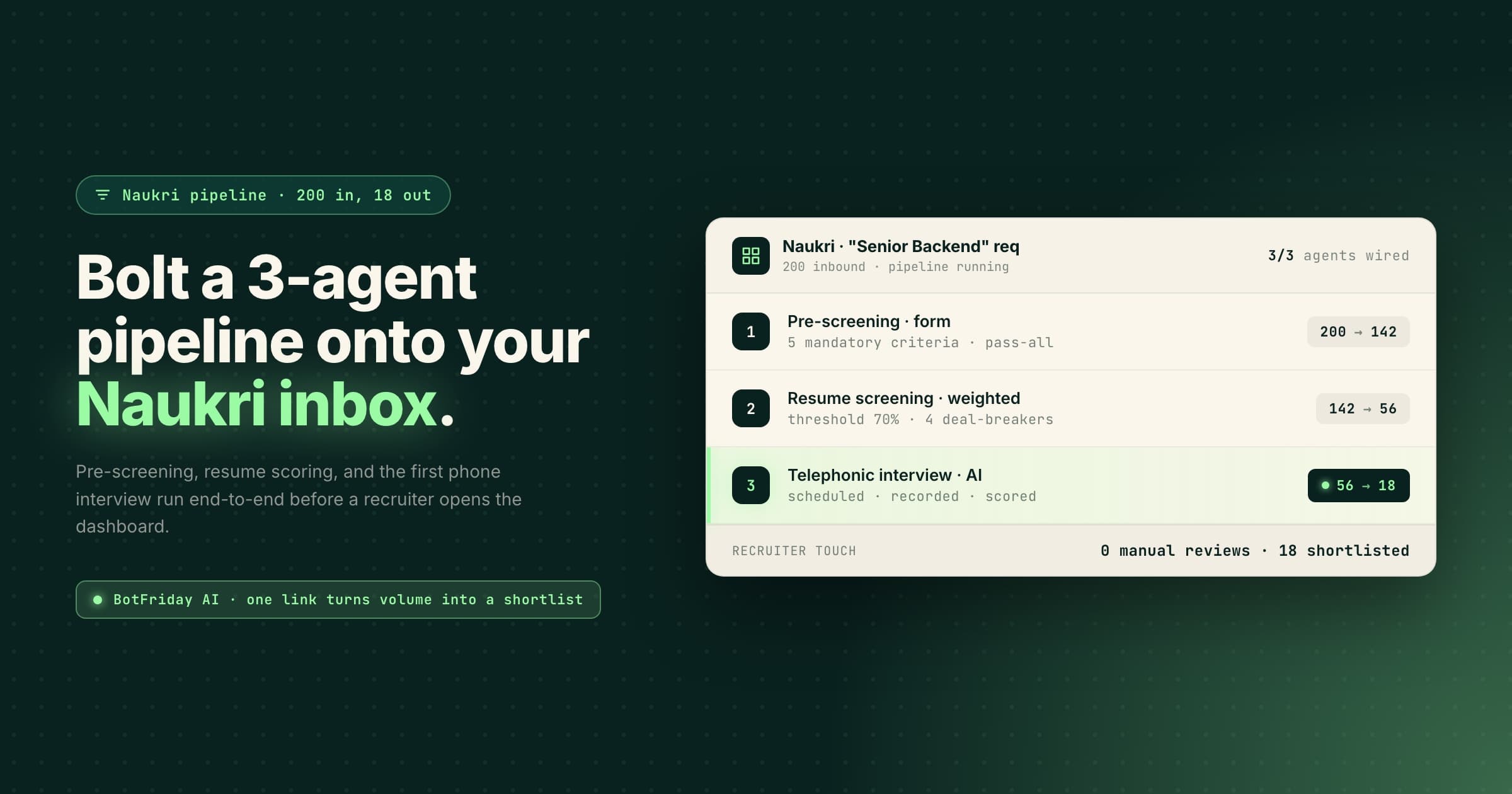
You post a job on Naukri and by evening your inbox is flooded. 200+ resumes, and someone still has to go through every single one, reading CVs, shortlisting, calling candidates, scheduling rounds. Days gone, just on screening. The same is true for outbound sourcing on Resdex, where every reply still needs the same manual filter.
Naukri is great for volume. But volume without filtering is just noise. There's no built-in way to know who's actually qualified until you've already spent hours finding out manually.
There is a way around this: you can redirect your Naukri Job Postings applicants and your Resdex outreach replies directly to AI agents that automatically perform screening and first-round interviews before recruiters step in manually.
That's what this blog is about.
How recruiters use Naukri
Naukri gives recruiters two core products and most hiring teams use one or both depending on the role.
Job Postings: You post a JD, candidates apply, resumes land in your Naukri inbox. Simple, inbound, high volume.
Resdex: Naukri's resume database. Instead of waiting for applicants, you go search for candidates yourself and reach out directly.
Both products work differently, and the way you plug an AI screening agent into each one is different too. That's what we'll cover next.
Automating Naukri screening with BotFriday AI
BotFriday AI is an AI-powered hiring tool. You can think of it like a pipeline you set up once, and it just runs.
From BotFriday AI's repository of hiring agents, these are the three agents we'll use in this workflow:
Pre-screening: Candidates fill a form. You define the fields and set screening criteria for each one. A candidate has to pass every single criteria to move forward. If they don't, they stop right there.
Resume screening: You set the resume screening criteria and assign weightage based on what matters most for the role. You can also add custom deal breakers for non-negotiable requirements. The agent then evaluates resumes against those criteria, highlights potential red flags like missing education or job hopping, so you're not just reviewing resumes manually, you're getting structured candidate insights.
Interview, on phone or video: The agent schedules the interview automatically and then conducts it. You choose the format: a telephonic interview, or a live video interview where the candidate joins from their browser and talks to an AI interviewer face to face. Either way, you get a summary at the end with the recording and transcript. The video format adds a screen-activity log, so you can see if a candidate kept switching tabs mid-answer.
By the time a candidate is on your shortlist, they've cleared all three. That's the whole point.
How candidates enter the screening pipeline
The way you get candidates into this pipeline is through the pre-screening agent. It has a shareable link, candidate clicks it, fills the form, and their responses land directly in your BotFriday AI dashboard.
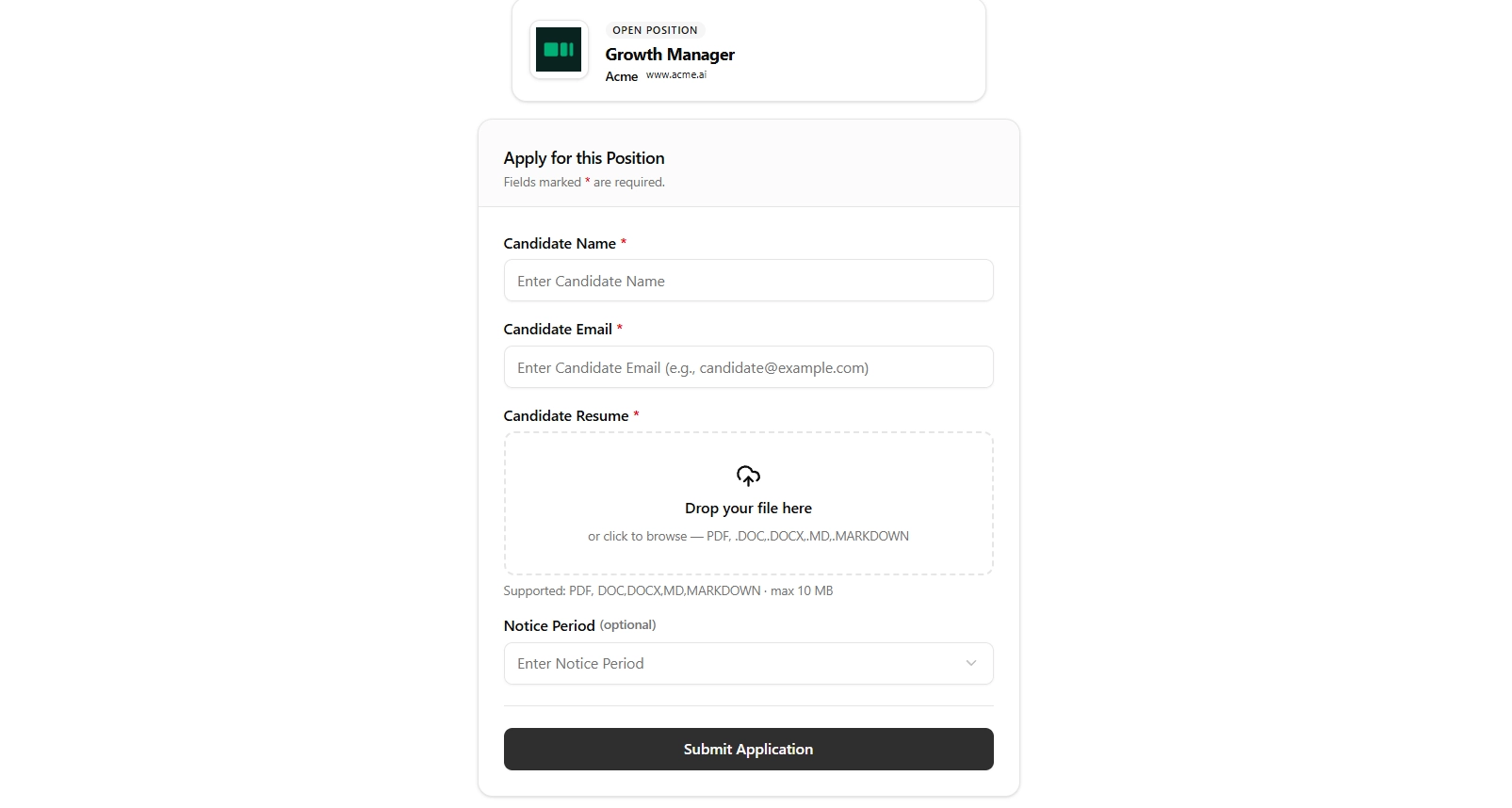
Naukri does support third party integrations, but only on their annual plan. If you don't have one, direct integration won't be possible.
For everyone else, that shareable link is your bridge between Naukri and BotFriday AI. How you use it depends on whether you're using Job Postings or Resdex.
Route 1: Naukri job postings (inbound applications)
This is for when you've posted a JD on Naukri and candidates are applying to it directly.
Here's how you fix that.
Option A: Add the link in the JD
This is the simplest method on this entire list. When you're writing your JD on Naukri, you paste your pre-screening agent link directly into the job description body, with one very specific line of copy alongside it.
Here's how to do it step by step:
Step 1: Create your pre-screening agent, set your screening rules, and copy the shareable link.
Step 2: Open your JD section for the job on Naukri.
Step 3: Scroll to the end of your JD and add a section like this:
📌 Important: To complete your application for this role, please fill out this short screening form: [Your Link Here]. Only candidates who complete this step will be considered for further rounds.
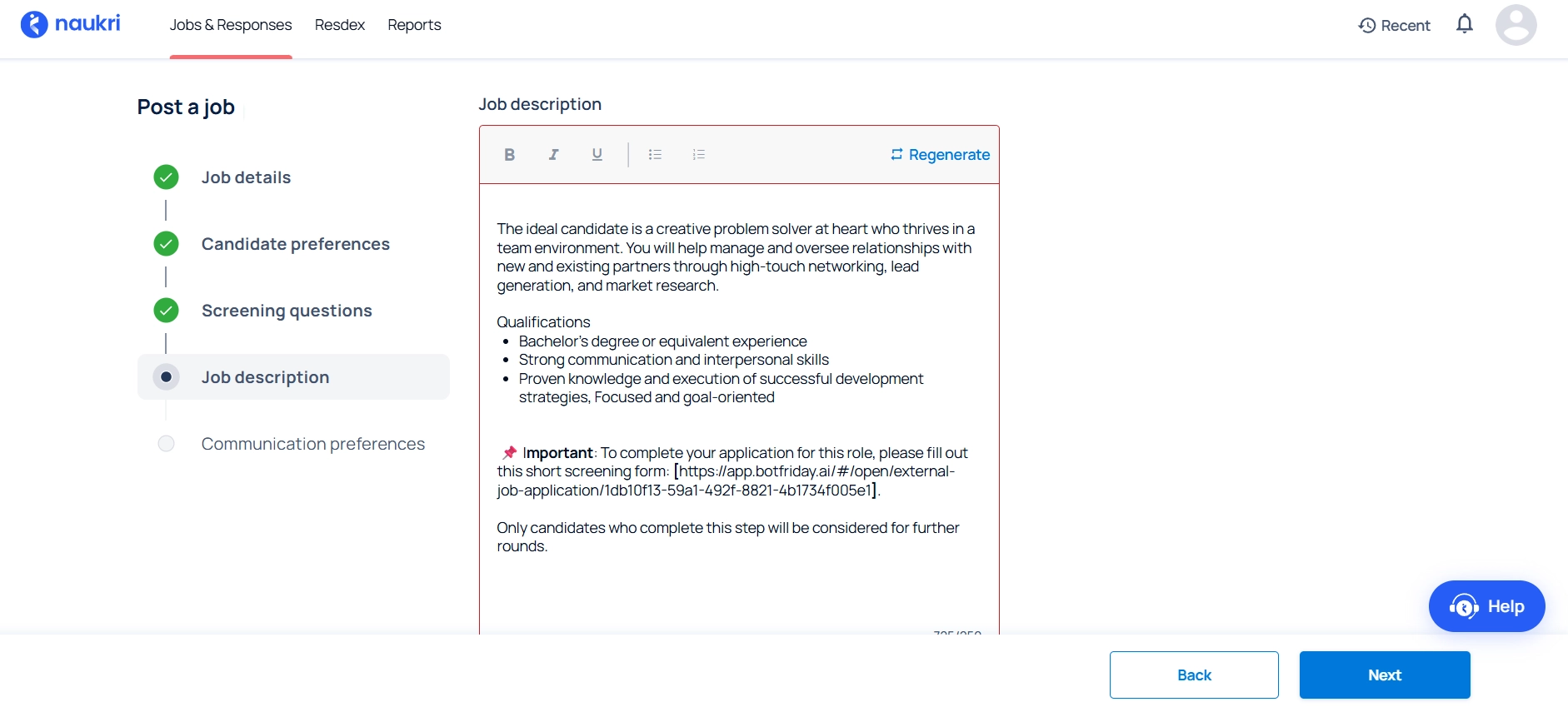
That last line is doing a lot of heavy lifting. It reframes the form from optional to mandatory and that changes candidate behaviour significantly. People who are genuinely interested will fill it.
Option B: Direct integration via Naukri API
Naukri offers API access on annual plans. With this setup, candidate applications can flow directly from Naukri into the BotFriday AI screening pipeline automatically.
This removes the need to manually redirect candidates through a separate screening link.
Since enterprise plans and API access come at an additional cost, this setup is typically more suitable for larger hiring teams with high-volume recruitment workflows.
For most recruiters, though, Option A is the simpler way to get started.
Route 2: AI screening for Naukri Resdex outreach
Resdex is Naukri's resume database. Instead of waiting for candidates to apply, you go find them yourself. The challenge with outbound sourcing has always been the same. You can find the profiles, but converting them into actual applicants requires follow-up, calls, back-and-forth. It's slow.
Here's how the pre-screening agent changes that entirely.
Here's the full workflow:
Step 1: Go into Resdex and run your search. Filter by role, experience, location, skills, whatever your criteria is.
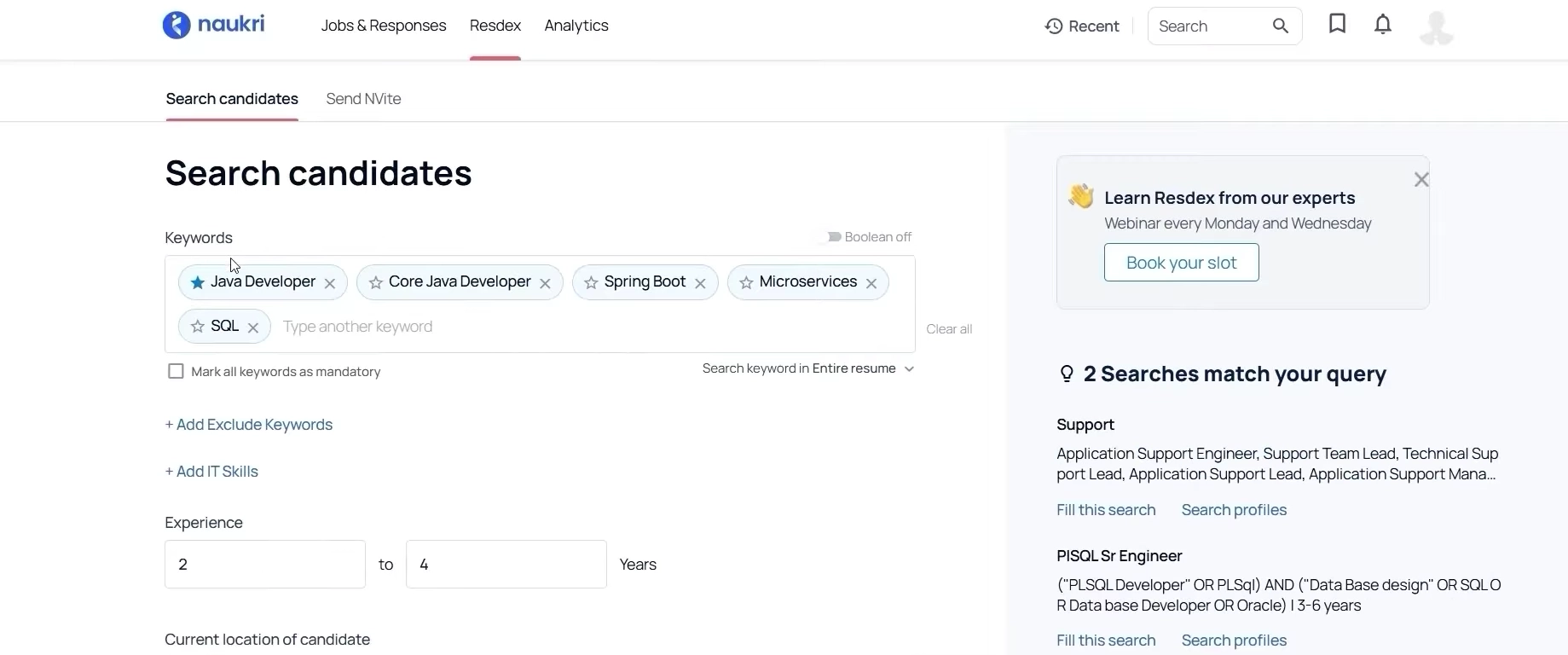
Step 2: Then you narrow it further until you're left with a manageable set of resumes worth reaching out to. Like here, we have 142 resumes that we can send a mass email to.
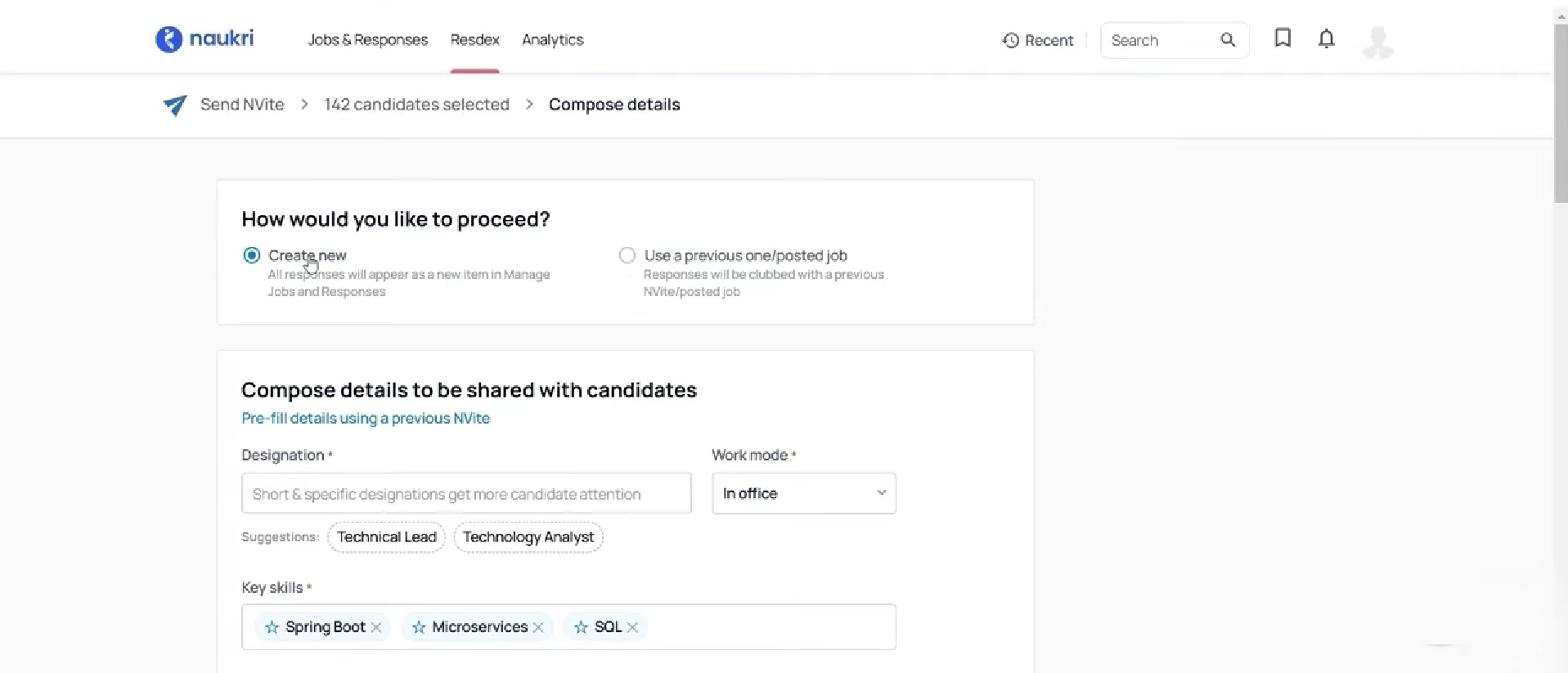
Step 3: Naukri's email composer has a JD block. That's where you paste your BotFriday AI pre-screening link, at the bottom of the JD.
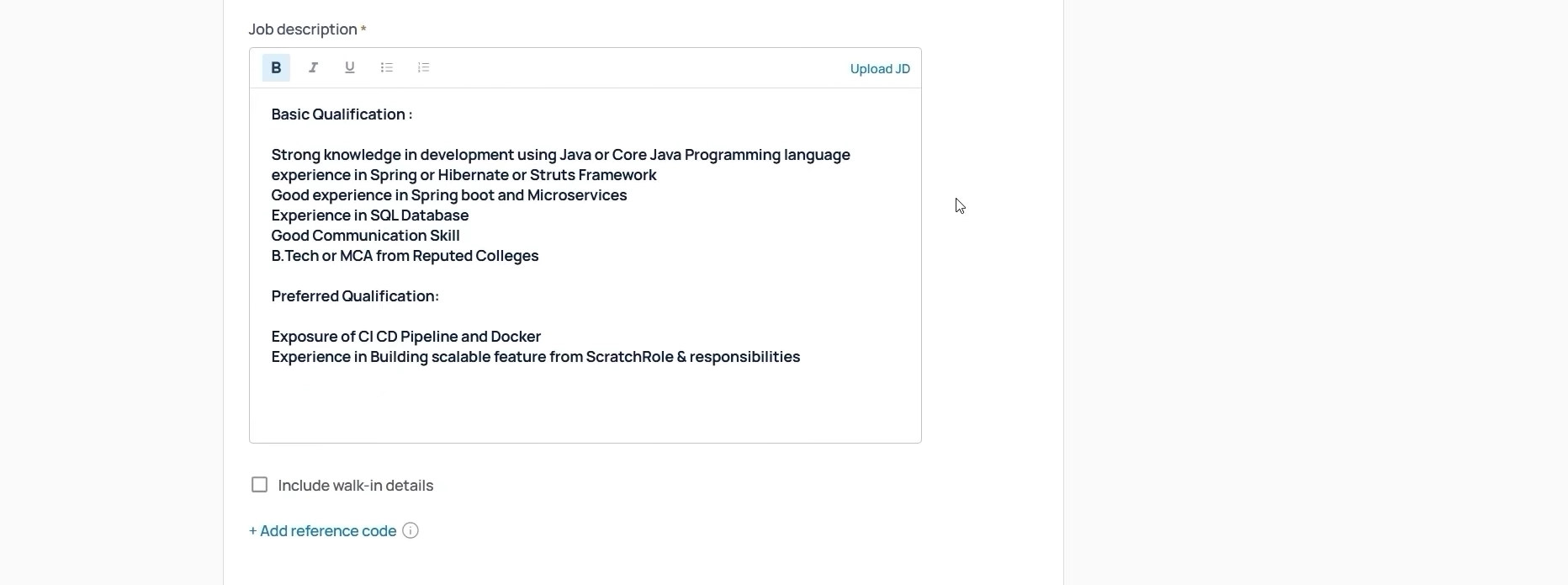
To make it work, just add a line at the bottom of the JD block, making it mandatory. Something like:
To be considered for this role, please complete this short pre-screening form: [link]
Step 4: Hit send. That's it.
Candidates who are actively looking and genuinely interested will click through, fill the form, and land directly in the BotFriday AI dashboard.
How the screening pipeline works after that
Once a candidate fills the pre-screening form, the pipeline takes over automatically. You don't have to do anything.
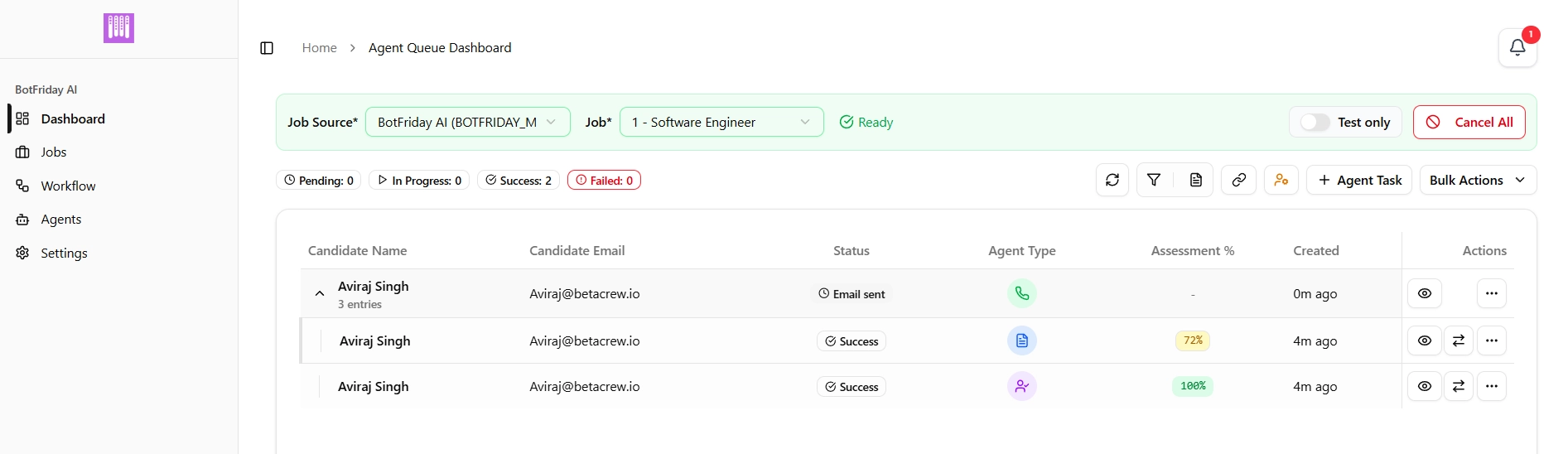
As you can see in the dashboard, each candidate moves through all three AI agents automatically. Once a candidate clears one stage, they're instantly moved to the next without any manual coordination from the recruiter.
Here's what that looks like:
- Pre-screening: Candidate fills the form. If they pass every criteria, they move to resume screening. If not, they stop here.
- Resume screening: Their resume is evaluated against your criteria, weightage and deal breakers. We set the pass threshold to 70%. Any resume scoring at or above that gets pushed to the interview agent automatically.
- Interview: The agent schedules and runs the interview automatically, as a phone call or a live video interview, whichever you picked for the role. We used the telephonic format for this run; the video interview agent plugs into the pipeline the same way. Once every candidate has been interviewed, set an assessment-score filter to pull your shortlist.
By the time a recruiter opens the BotFriday AI dashboard, the work is already done for them.
Final thoughts
Naukri doesn't offer plug-and-play integration for most teams, and that's fine. Both routes covered here, adding a link to your JD or embedding it in your Resdex outreach, work with what Naukri already gives you. No annual plan required, no complex setup.
The result is straightforward: less time spent on manual screening, shortlists that actually reflect your criteria, and hiring cycles that don't drag on because of top-of-funnel bottlenecks.
If you're already using Naukri and want to see this setup in practice, book a demo with our team.