Here's what landed in BotFriday in April.
Reruns When Criteria Change
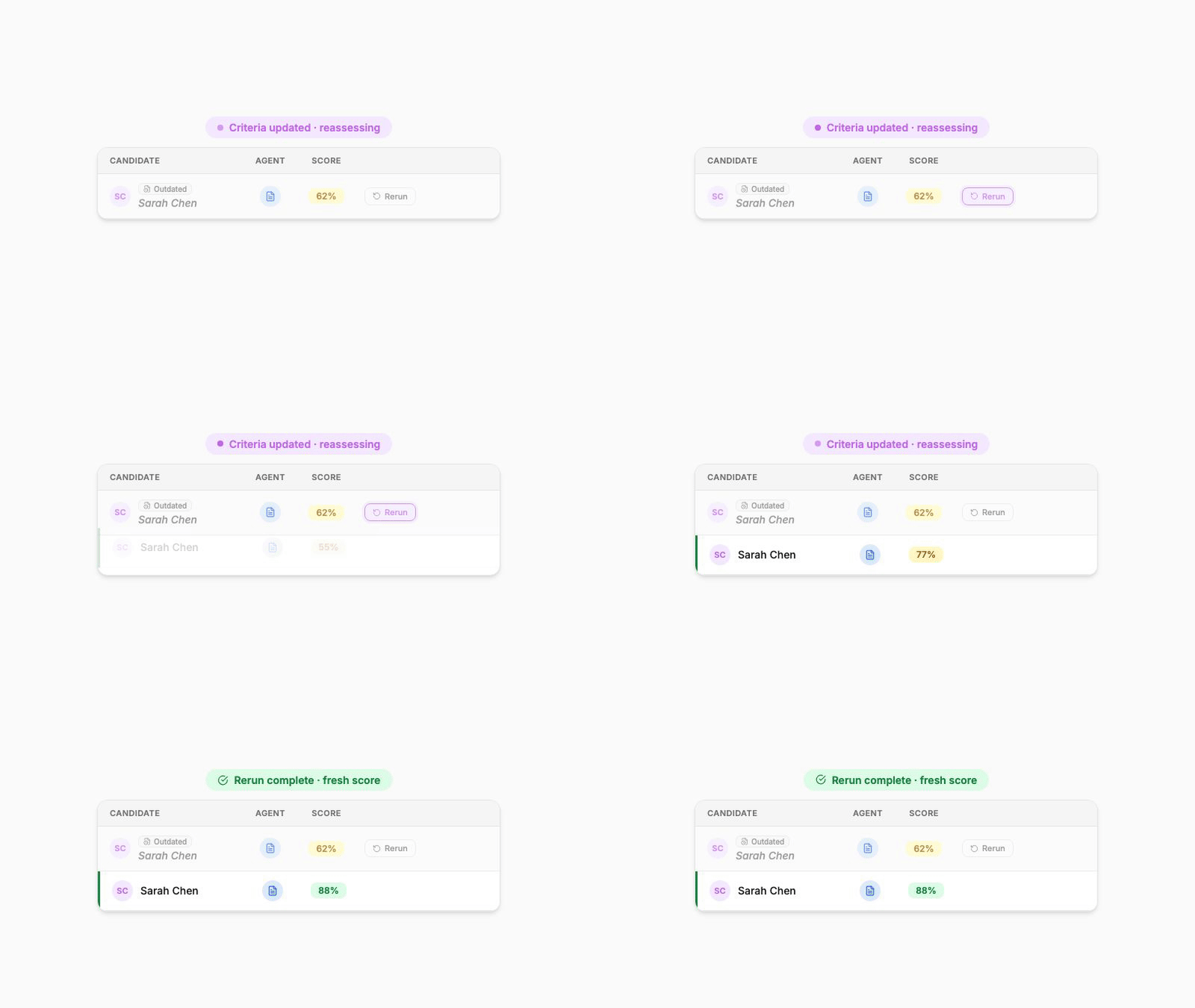
You're halfway through screening 300 candidates for a Product Manager role when a stakeholder asks you to weight customer-facing experience more heavily. Until now, that meant re-queueing every candidate one by one. As of this month, you tighten the agent config and the whole pool gets re-scored against the new bar.
This is the feature we're most excited about this month. With one click, you can rerun any candidate against the updated criteria, and BotFriday handles the rest.
When you update an agent's configuration (assessment criteria, dealbreakers, prompts, anything that would change the outcome), every existing run against that agent is automatically marked Outdated. The original result stays visible so you have an audit trail, but it's clearly flagged as stale. You then have two ways to re-assess:
- Per candidate: From the row's more-actions menu, pick "Rerun Task" to re-evaluate just that candidate with the new configuration.
- In bulk: Open the Rerun dialog from the dashboard, pick the agent instance, and rerun every outdated candidate at once. Or only those that match your current filters.
This means you can iterate on your assessment criteria without losing the work you've already done. Tighten the rubric, hit rerun, get fresh scores against the new bar. The fresh result appears alongside the old one with a clean side-by-side audit trail.
How to use it: Look for the Outdated badge on candidate rows after editing an agent. The Rerun action lives in the row menu for a single candidate, and the bulk Rerun button sits in the dashboard action bar.
Bulk Report Downloads
You've narrowed 80 candidates down to 12 worth a hiring panel discussion. Tick those 12, hit Download Reports, and walk into the meeting with a single combined PDF instead of 12 browser tabs.
We've added selection mode to the dashboard. Tick the candidates you care about, click Download Reports, and you get a combined report covering everyone you selected. Useful for sharing a shortlist with a hiring manager, archiving a job's results at the end of a campaign, or sending an interview summary to a client.
For long lists, the report generator now paginates under the hood, so even campaigns with hundreds of candidates download cleanly instead of timing out. You can also filter the candidate list by identifier first, which keeps the download focused on exactly the people you're shortlisting.
How to use it: On the dashboard, switch on selection mode in the action bar, tick the candidates you want, and click Download Reports.
Sharper LEX Scoring
A candidate spent five years at a consultancy adjacent to your industry, but never with the exact job title in your requirements. Last month, LEX might have scored them low on paper. This month, LEX recognises the transferable experience and surfaces them in your top tier.
LEX, the resume screening agent, got a meaningful prompt upgrade this month. Without going into the internals, the short version is that LEX now does a better job of distinguishing between candidates who tick a box on paper and candidates who actually match the spirit of a requirement. Edge cases like adjacent industry experience, transferable skills from a different role, and partial matches against multi-part criteria now get scored more thoughtfully.
You won't see a new button for this. You'll just notice that scores feel more aligned with how you'd score the same resume yourself. If you have a screening pipeline that's been running for a while, this is a good time to use the new rerun feature above to re-score your existing pool against the upgraded LEX.
A Refreshed Look
We've refreshed the BotFriday logo and the dashboard sidebar this month. The new mark is cleaner and works better at small sizes (in browser tabs, favicons, and the app sidebar), and the navigation has been tightened up so you can get to agents, jobs, and the dashboard with fewer clicks. Same product, fewer rough edges.
These updates are live for all BotFriday accounts. If you have questions or want a walkthrough, book a quick demo with our team.